If you are trying to identify an Apple card from a photo, check the printed name first, then the wording on the back, and only then the color or artwork. An apple gift card picture can usually tell you whether the card is meant for Apple products, App Store credit, older iTunes purchases, or a narrower service such as Apple Music. The front gives you a quick guess; the back is what makes the answer useful.
What an Apple gift card picture can show
Card name
The card name is the strongest first clue. Apple Gift Card, App Store & iTunes, Apple Store Gift Card, and Apple Music do not mean the same thing. If a listing photo hides or blurs the name, ask for a clearer image before judging the card by its logo.
Front design
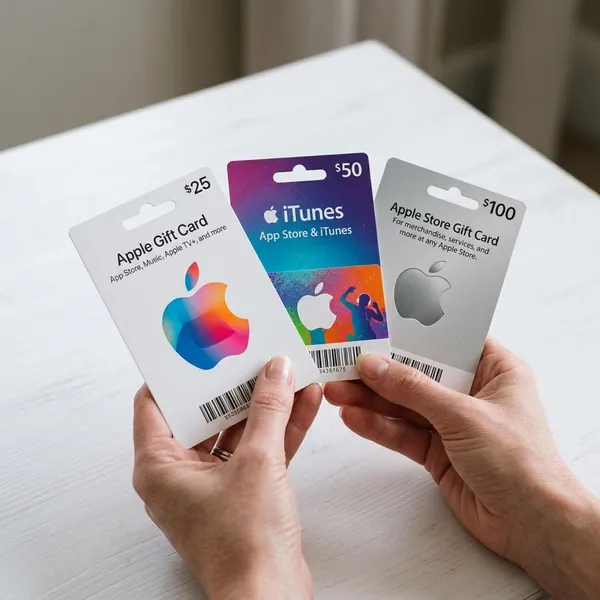
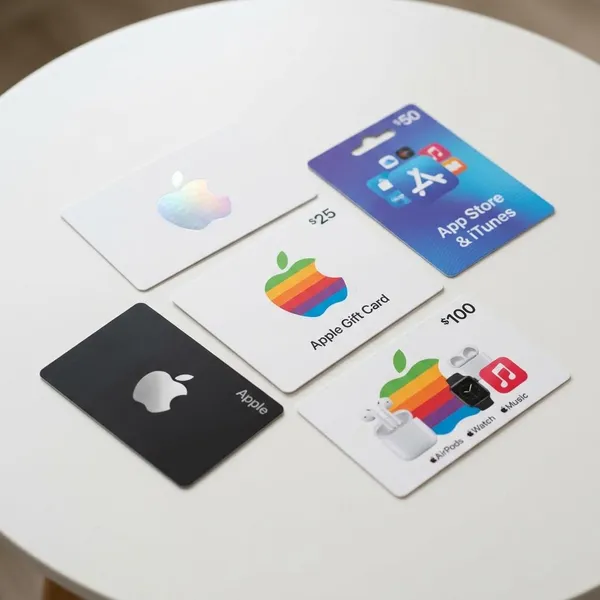
The front design helps you sort the card into a likely family. A newer Apple Gift Card often has a colorful Apple logo on a clean background, while older App Store and iTunes cards may use blue tones or entertainment-style artwork. Older Apple Store cards can look plainer, often with neutral colors.
Use the design as a quick filter, not final proof. A card can look old and still be genuine, and a polished photo can still hide the wrong card type for your needs.
Back wording
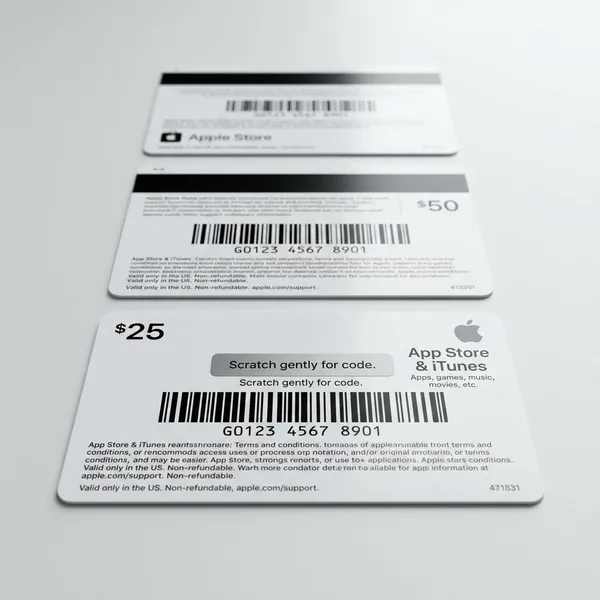
The back usually gives the more practical answer. Look for phrases about redeeming in the App Store, adding value to an Apple Account, using the card at apple.com, or shopping in an Apple Retail Store. Those phrases tell you what the card was designed to do.
- App Store or iTunes wording: usually points to digital purchases or account credit.
- Apple Store or apple.com wording: usually points to physical Apple products or accessories.
- Mixed account and shopping wording: may indicate a newer, more flexible Apple Gift Card, depending on region.
Code area
The code area should look clean, aligned, and professionally covered. Be careful with a resale photo that shows a fully exposed code, a scratched strip, a lifted label, or printing that looks pasted on. That does not prove the card is fake, but it is enough reason not to buy casually.
Usage limits
A picture cannot show the remaining balance, but it can show likely limits. For example, someone trying to buy an iPhone should not assume an older App Store and iTunes card will work for hardware. Someone who only wants app credit should avoid assuming an Apple Store Gift Card works the same way as digital credit.
The safest order is simple: read the name, check the back wording, then look for region notes. Color and artwork come after those checks.
Main Apple gift card types
Apple Gift Card
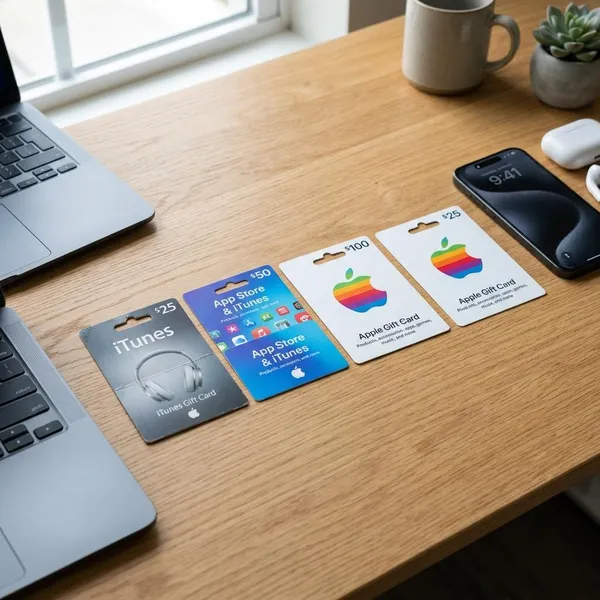
The newer Apple Gift Card is usually the broadest type in supported regions. It is often shown with a colorful Apple logo and can commonly be used across Apple shopping and digital services, but the back terms and country rules still matter.
If you received one as a gift and want flexibility, this is the card type you would usually hope to see. Still, do not rely on a front-only photo if you are buying it from someone else.
App Store and iTunes Gift Card
An App Store and iTunes Gift Card is mainly associated with digital use: apps, games, in-app purchases, subscriptions, music, movies, books, or Apple account credit. It is easy to confuse with a modern Apple Gift Card because both are Apple-branded.
A common mistake is buying this older digital card when the real goal is a physical device. If the planned purchase is a Mac, iPhone, iPad, or AirPods, check the back before assuming this card will help.
Apple Store Gift Card
The Apple Store Gift Card usually points toward Apple retail or online store purchases. Older versions may look minimal, with silver, gray, white, or gold styling rather than bright App Store artwork.
The key distinction is wording: Apple Store means Apple's retail store environment, while App Store means Apple’s digital marketplace. One missing word can change the intended use of the card.
Older iTunes cards
Older iTunes cards may look dated, with legacy branding or music-focused graphics. Do not dismiss them only because the design no longer matches current Apple gift cards.
For an old card found in a drawer, the useful checks are whether the code is still covered or readable, whether the region matches your account, and whether the redemption instructions still point to a valid Apple redemption path.
Apple Music gift cards
Apple Music gift cards are narrower than general Apple cards. If the front prominently says Apple Music, treat it as music-subscription related unless the back clearly says it can be used more broadly.
| Card type shown in the picture | Best first assumption | What to confirm before using it |
|---|---|---|
| Apple Gift Card | Broad Apple use in many supported regions | Back terms and country or region |
| App Store & iTunes | Digital purchases or Apple account credit | Whether it can help with your specific purchase |
| Apple Store Gift Card | Apple retail or online store purchases | Whether digital services are excluded |
| Apple Music | Music subscription use | Whether any broader redemption is stated |
How to identify an Apple gift card from the front
Apple logo style
A colorful, centered Apple logo usually suggests a newer Apple Gift Card. A smaller or simpler logo may point to an older Apple Store, iTunes, or App Store-era card. The logo is helpful, but it should never outrank the printed title.
Card title
Read the full title exactly as printed. If it says Apple Gift Card, your next step is to confirm broad-use terms on the back. If it says App Store & iTunes, start by assuming digital use. If it says Apple Store Gift Card, start by assuming retail product use.
For resale listings, this is where you should be strict. A seller who only says "Apple card" but does not show the title has not given enough information.
Background color
Color can help you sort the card quickly: white with colorful Apple artwork often suggests the newer card, blue often suggests App Store or iTunes, and metallic or neutral tones may suggest older Apple Store cards.
Lighting can mislead you. A gray photo, filtered image, or low-resolution screenshot can make one card family look like another, so color should only support a conclusion you already checked through wording.
Brand wording
Words such as App Store, iTunes, Apple Music, and Apple Store are functional labels, not decorative text. If you are choosing a card for a specific purpose, match the wording to that purpose before thinking about the design.
- For apps or subscriptions: App Store, iTunes, or Apple account wording matters most.
- For a device or accessory: Apple Store, apple.com, or newer Apple Gift Card wording is more relevant.
- For a secondhand purchase: missing wording is a reason to pause, not guess.
Design age
An older-looking design can mean the card belongs to a previous Apple gift card system. That is not automatically bad. It simply means the card may have narrower rules, older redemption instructions, or region-specific conditions that matter more than the artwork.
If you are sorting a family member’s old cards, a dated iTunes design might still be worth checking. If you are buying from a stranger, the same dated design should make you ask for clearer back photos before paying.
How to confirm the card type from the back
Redemption instructions
Start with the redemption instructions because they tell you the actual path Apple expects you to use. "Redeem in the App Store" points in a different direction from "use at Apple Retail Store" or "use at apple.com."
If the instructions mention adding the value to an Apple Account and also mention shopping with Apple, the card may be a newer flexible type. Even then, region wording can still limit where it works.
Store use wording
Store-use wording is the best way to identify a retail-focused card. Phrases about Apple Retail Store or Apple Online Store usually mean the card was intended for products and accessories rather than app-only spending.
This is the section to check when your planned purchase is expensive. For a phone or laptop, do not rely on “Apple” in the name alone; the back should support the purchase type.
App Store wording
Mentions of the App Store, iTunes Store, subscriptions, or account redemption usually point toward digital use. That is good if you want app credit or subscription payments, but it may be the wrong fit for physical products.
Country or region notes
Country or region notes can decide whether a genuine card is usable for you. A card bought in one country may not match an Apple Account set to another region.
This matters most with travel gifts and online resale listings. A real, unused card can still be a poor purchase if the region does not match your account or intended store.
Serial number and code area
The serial number and code area should look consistent with the rest of the card. Watch for a code that is already visible in a sale photo, a scratch area that looks lifted or replaced, or mismatched fonts around the code.
For a safer online check, ask for photos that show the wording and general code-area condition while keeping the actual redemption code covered. You need enough detail to identify the card, not enough detail for someone to steal its value.
- Check first: redemption wording and card title.
- Check second: country or region restrictions.
- Check before buying: code cover, print quality, and whether the seller hides important text.
- Do not do: pay for a card based only on a front photo.
Conclusion
The most reliable way to identify an Apple gift card from a picture is to treat the front as a clue and the back as the decision point. If the name, redemption wording, region notes, and code area all line up, you can judge the card with much more confidence; if any of those pieces are missing or hidden, it is better to slow down than buy or redeem the wrong card.